
Minecraft RTX Texture Packs (2026): Best Ray Tracing Resource Packs for Realistic Graphics
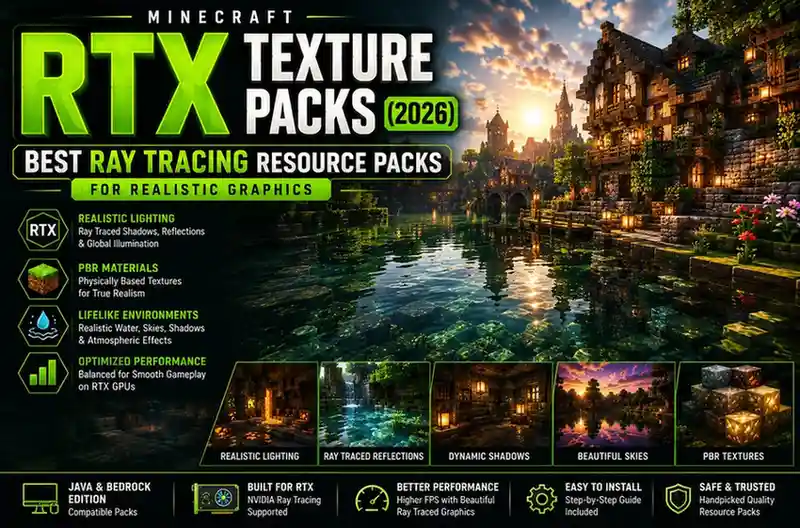
Minecraft RTX texture packs enhance the game’s visuals using Physically Based Rendering (PBR) materials that interact with advanced lighting technologies such as ray tracing. On Minecraft Bedrock Edition, compatible RTX resource packs work with NVIDIA’s official ray tracing implementation to produce realistic reflections, shadows, and global illumination. On Minecraft Java Edition, similar visual effects are achieved by combining PBR-ready resource packs with shader loaders such as Iris Shaders and optimization mods like Sodium.
If you’re looking for the most realistic Minecraft graphics, choosing the right RTX texture pack is just as important as having compatible hardware.
Quick Comparison
| Resource Pack | Edition | PBR Support | RTX Ready | Best For | Performance |
|---|---|---|---|---|---|
| Kelly’s RTX | Bedrock | ✅ | ✅ | Vanilla RTX Experience | ⭐⭐⭐⭐⭐ |
| Vanilla RTX | Bedrock | ✅ | ✅ | Official RTX Gameplay | ⭐⭐⭐⭐⭐ |
| ModernArch | Java | ✅ | Shader Compatible | Ultra Realistic Builds | ⭐⭐⭐☆☆ |
| Defined PBR | Java | ✅ | Shader Compatible | Everyday Gameplay | ⭐⭐⭐⭐☆ |
| Stratum | Java | ✅ | Shader Compatible | Luxury Architecture | ⭐⭐⭐☆☆ |
| Patrix | Java | ✅ | Shader Compatible | Photorealistic Survival | ⭐⭐⭐⭐☆ |
Minecraft’s block-based world has a unique visual style, but modern resource packs have pushed the game far beyond its original appearance. With the introduction of ray tracing, PBR materials, and advanced shader technology, players can transform ordinary landscapes into environments with realistic lighting, detailed surfaces, dynamic reflections, and cinematic shadows.
However, finding the right Minecraft RTX texture pack isn’t always straightforward. Many players search for RTX texture packs, only to discover that some work exclusively on Bedrock Edition, while others are actually PBR resource packs designed for Java Edition. This often leads to confusion about compatibility, installation, and hardware requirements.
This guide explains everything you need to know before downloading an RTX texture pack. You’ll learn how RTX technology works in Minecraft, the difference between ray tracing and shaders, which resource packs provide the best visual quality, and how to choose the right option for your version of the game.
Whether you’re building realistic cities, creating cinematic videos, or simply exploring Minecraft with enhanced graphics, this guide will help you find the best RTX resource pack for your setup.
What Is Minecraft RTX?
Minecraft RTX is a graphics technology that uses real-time ray tracing to simulate how light behaves in the real world. Instead of using traditional lighting methods, RTX calculates how light rays bounce between objects, producing more natural shadows, reflections, transparency, and indirect lighting.
Unlike standard texture packs that only replace images, RTX resource packs also include Physically Based Rendering (PBR) materials. These materials define how different surfaces interact with light. For example:
- Stone appears rough instead of flat.
- Metal reflects nearby objects realistically.
- Water creates accurate reflections.
- Glass becomes transparent with natural light refraction.
- Gold, diamond, and emerald blocks respond differently to sunlight depending on their material properties.
The result is a Minecraft world that feels significantly more immersive without changing the game’s mechanics.
It’s important to understand that RTX is not simply a higher-resolution texture pack. Texture resolution determines how detailed an image looks, while RTX focuses on how light interacts with those textures. A 32x PBR pack with proper ray tracing can often appear more realistic than a standard 512x resource pack without advanced lighting.
RTX vs Ray Tracing vs PBR: What’s the Difference?
One of the biggest misconceptions in the Minecraft community is that RTX, ray tracing, and PBR all mean the same thing. While they’re closely related, each serves a different purpose.
| Technology | Purpose | Works On |
|---|---|---|
| RTX | NVIDIA’s hardware-accelerated ray tracing technology | Supported RTX GPUs |
| Ray Tracing | Realistic lighting, shadows, reflections, and global illumination | Compatible rendering engines |
| PBR (Physically Based Rendering) | Defines how materials react to light | Resource packs for Java and Bedrock |
Think of them as three parts of the same visual pipeline:
- RTX hardware provides the processing power for advanced lighting.
- Ray tracing calculates realistic light behavior.
- PBR resource packs tell Minecraft how each surface should react to that light.
Without PBR textures, even an RTX-enabled system won’t achieve the same level of realism because blocks lack the material information needed for accurate lighting effects.
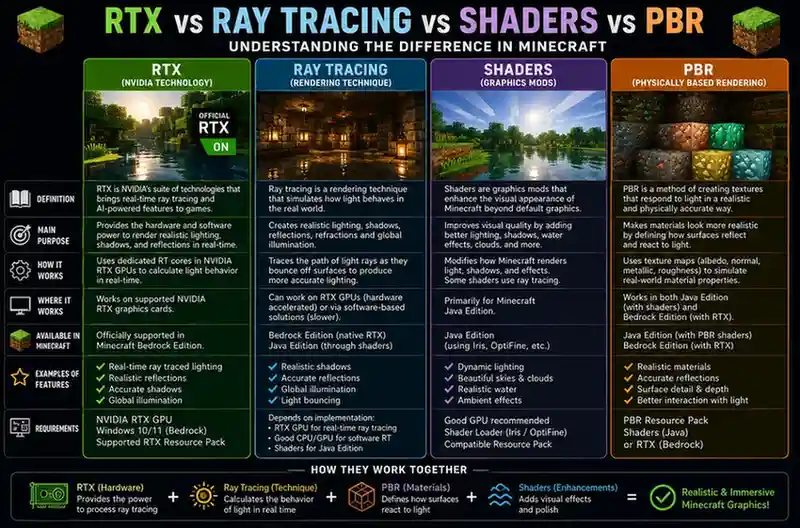
This is why many Java Edition players combine PBR-ready resource packs with shader packs that support physically based rendering. While Java doesn’t include native RTX support, the combination can produce visuals that closely resemble Bedrock’s official RTX implementation.
Why Do Players Use RTX Texture Packs?
RTX resource packs aren’t only about making Minecraft look better—they also create a more immersive and realistic gameplay experience. Builders use them to showcase detailed architecture, content creators rely on them for cinematic videos and screenshots, and survival players enjoy exploring worlds with dynamic lighting and atmospheric effects.
Compared with standard resource packs, RTX-enabled textures offer several advantages:
- More realistic reflections on water, glass, and polished blocks.
- Dynamic shadows that change naturally with the environment.
- Enhanced caves and underground exploration through improved lighting.
- Greater material depth using PBR textures.
- More immersive day and night cycles.
- Better visual presentation for modern builds and large-scale projects.
If visual quality is your priority and your hardware supports it, RTX resource packs provide one of the biggest graphical upgrades available for Minecraft.
Can Minecraft Java Edition Use RTX?
One of the most common misconceptions is that Minecraft Java Edition supports NVIDIA RTX in the same way as Bedrock Edition. It doesn’t—but that doesn’t mean Java players can’t enjoy realistic lighting and graphics.
Minecraft Java Edition does not include native RTX support. Instead, it relies on a combination of PBR (Physically Based Rendering) resource packs and modern shader loaders to recreate many of the same visual effects. When paired with compatible shaders, Java can produce impressive reflections, dynamic shadows, global illumination, and realistic lighting that closely resemble an RTX experience.
The most common setup includes:
- Iris Shaders for modern shader support
- Sodium for better performance
- PBR-compatible resource packs such as ModernArch, Patrix, or Defined PBR
- A shader pack that supports PBR materials
Although this approach requires a few extra installation steps, it gives Java players greater flexibility to customize graphics while supporting a wide range of hardware.
Bottom line: Bedrock Edition offers official RTX support, while Java Edition achieves similar results through shaders and PBR resource packs.
Minecraft Java vs Bedrock RTX
Choosing the right edition depends on your hardware, preferred mods, and the type of graphics you’re aiming for.
| Feature | Java Edition | Bedrock Edition |
|---|---|---|
| Official RTX Support | ❌ No | ✅ Yes |
| PBR Resource Packs | ✅ Yes | ✅ Yes |
| Shader Support | ✅ Extensive | Limited |
| Native Ray Tracing | ❌ | ✅ |
| Mod Support | ⭐⭐⭐⭐⭐ | ⭐⭐☆☆☆ |
| Performance | Good with Sodium | Excellent |
| Best For | Customization & Mods | Plug-and-play RTX |
Java Edition
Java offers the largest collection of community-made resource packs, shader packs, and graphics mods. Players can combine Iris, Sodium, and high-quality PBR textures to create highly realistic worlds while retaining full access to mods and customizations.
Bedrock Edition
Bedrock provides the simplest RTX experience. Supported RTX resource packs work directly with Minecraft’s built-in ray tracing system on compatible NVIDIA graphics cards, making setup easier for players who want realistic graphics without additional configuration.
Do You Need an RTX Graphics Card?
Not always.
Many players assume RTX texture packs only work on expensive RTX GPUs. The reality depends on which version of Minecraft you’re using.
For Minecraft Bedrock Edition
If you want official RTX ray tracing, you’ll need:
- An NVIDIA GeForce RTX graphics card
- A supported version of Minecraft Bedrock Edition
- Windows 10 or Windows 11
- Compatible RTX resource packs
Without RTX-capable hardware, the ray tracing option won’t be available.
For Minecraft Java Edition
Java players have more flexibility.
While high-end graphics cards improve performance, many PBR resource packs work with shader-based rendering instead of native RTX. This means AMD graphics cards and older NVIDIA GPUs can still achieve significantly improved visuals, although the experience depends on your chosen shader pack and hardware.
Recommended Hardware for RTX Texture Packs
RTX resource packs can be demanding, especially when using high-resolution textures and advanced lighting effects.
| Component | Minimum | Recommended |
|---|---|---|
| GPU | RTX 2060 | RTX 3070 or newer |
| CPU | Intel Core i5 / Ryzen 5 | Intel Core i7 / Ryzen 7 |
| RAM | 16 GB | 32 GB |
| VRAM | 6 GB | 8–12 GB |
| Storage | SSD | NVMe SSD |
If you’re planning to use 256x, 512x, or higher-resolution PBR resource packs, stronger hardware becomes increasingly important to maintain stable frame rates.
How to Choose the Best RTX Texture Pack
Not every RTX resource pack is designed for the same type of player. Before downloading one, think about how you usually play Minecraft.
Choose a realistic pack if…
- You enjoy survival exploration.
- You build modern cities or realistic landscapes.
- You create screenshots or cinematic videos.
- Visual quality matters more than maximum FPS.
Choose a lightweight PBR pack if…
- You have a mid-range gaming PC.
- You want smoother gameplay.
- You stream or record Minecraft.
- You don’t need extremely high resolutions.
Choose premium packs if…
- You own a high-end RTX graphics card.
- You want maximum realism.
- You’re comfortable with higher hardware requirements.
Matching the resource pack to your hardware is often more important than simply choosing the highest texture resolution.
Best Minecraft RTX Texture Packs
Rather than ranking packs only by popularity, we’ve selected resource packs that consistently deliver excellent visual quality, active development, and compatibility with current Minecraft versions.
1. Kelly’s RTX — Best Overall for Bedrock Edition
Best for: Vanilla RTX gameplay
Kelly’s RTX is one of the most widely used RTX resource packs for Minecraft Bedrock Edition because it improves the game’s lighting while preserving Minecraft’s original art style. Instead of completely redesigning blocks, it enhances existing textures with realistic material properties, allowing light to interact naturally with water, glass, stone, wood, and metal.
The result feels familiar but dramatically more immersive. Sunlight filters through windows, caves become darker and more atmospheric, and reflective surfaces react naturally to changing light conditions.
Unlike many high-resolution resource packs, Kelly’s RTX focuses on balance. It delivers impressive graphics without overwhelming players who still want Minecraft to feel like Minecraft.
Pros
- Excellent vanilla appearance
- Official Bedrock RTX support
- Regular community updates
- Great balance between realism and familiarity
Cons
- Requires RTX-capable hardware
- Limited to Bedrock Edition
Overall Rating: ★★★★★ (9.8/10)
2. ModernArch — Best Premium RTX Experience
Best for: Luxury builds and cinematic projects
ModernArch is considered one of the highest-quality PBR resource packs available for Minecraft Java Edition. Every texture is handcrafted with exceptional detail, making concrete, wood, stone, metals, and decorative blocks appear far more realistic than the default game.
When paired with a compatible shader pack, ModernArch transforms Minecraft into a visually stunning experience with lifelike lighting, realistic reflections, and high-definition materials.
Because of its high resolution, however, this pack is best suited for powerful gaming PCs equipped with modern graphics hardware.
Pros
- Outstanding realism
- Premium-quality textures
- Excellent PBR implementation
- Perfect for screenshots and cinematic builds
Cons
- High hardware requirements
- Premium content may require a paid subscription
Overall Rating: ★★★★★ (9.7/10)
Want even more lifelike visuals?
Explore our Realistic Minecraft Texture Packs guide to discover HD resource packs for both Java and Bedrock Edition, including options for mid-range and low-end PCs
3. Defined PBR — Best for Balanced Realism
Best for: Survival gameplay and everyday use
Defined PBR is an excellent choice for players who want realistic lighting and material effects without dramatically changing Minecraft’s familiar appearance. Instead of introducing completely new textures, it refines the default look by adding physically based rendering (PBR) properties to existing blocks.
Stone surfaces appear rougher, polished blocks reflect light more naturally, and wood gains additional depth without feeling out of place. This makes Defined PBR a great option for long survival worlds where players want improved visuals while preserving Minecraft’s original style.
Compared to extremely high-resolution packs, Defined PBR is also easier to run on mid-range gaming systems when paired with an optimized shader setup.
Pros
- Preserves Minecraft’s original design
- Excellent balance between quality and performance
- Easy to combine with modern shader packs
- Suitable for long survival sessions
Cons
- Less dramatic than ultra-realistic packs
- Java Edition setup requires shaders
Overall Rating: ★★★★☆ (9.4/10)
4. Patrix — Best for Ultra-Realistic Survival Worlds
Best for: High-end gaming PCs
Patrix is widely recognized as one of the most detailed realistic resource packs available for Minecraft Java Edition. Every block is redesigned with high-resolution textures, making forests, mountains, villages, caves, and building materials appear significantly more lifelike.
When combined with compatible PBR shaders, Patrix creates realistic reflections, richer lighting, and detailed surface materials that make exploration and building much more immersive.
Because of its high-resolution textures, Patrix performs best on systems with dedicated graphics cards and sufficient video memory.
Pros
- Exceptional visual detail
- Frequent updates
- Excellent compatibility with PBR shaders
- Ideal for realistic builds
Cons
- High GPU usage
- Not suitable for older computers
Overall Rating: ★★★★★ (9.6/10)
5. Vanilla RTX — Best for Players Who Love Default Minecraft
Best for: Vanilla gameplay with RTX
Vanilla RTX demonstrates how effective ray tracing can be without replacing Minecraft’s original textures. Instead of changing the game’s visual identity, it adds realistic lighting, reflections, shadows, and material properties to the familiar blocks players already know.
This approach makes Vanilla RTX an excellent option for players who appreciate Minecraft’s classic appearance but want modern graphical improvements.
Pros
- Keeps the original Minecraft style
- Excellent lighting effects
- Official Bedrock RTX compatibility
- Easy to recognize familiar textures
Cons
- Requires RTX-capable hardware
- Limited customization compared to Java
Overall Rating: ★★★★★ (9.5/10)
Which RTX Texture Pack Should You Choose?
The “best” RTX resource pack depends on your hardware and the type of experience you’re looking for.
| If You Want… | Recommended Pack |
|---|---|
| Overall Best Experience | Kelly’s RTX |
| Maximum Realism | ModernArch |
| Balanced Graphics | Defined PBR |
| Realistic Survival | Patrix |
| Vanilla Look with RTX | Vanilla RTX |
| Cinematic Builds | ModernArch |
Instead of downloading the highest-resolution pack available, choose one that matches your computer’s capabilities. A smooth 60 FPS experience with a balanced resource pack is usually more enjoyable than running an ultra-HD pack with frequent frame drops.
How to Install Minecraft RTX Texture Packs
The installation process varies depending on whether you’re using Java Edition or Bedrock Edition.
For Java Edition
- Install the latest version of Minecraft Java Edition.
- Install Iris Shaders (or another compatible shader loader).
- Add Sodium if you want better performance.
- Download a compatible PBR resource pack.
- Copy the resource pack into the resourcepacks folder.
- Enable the pack from Options → Resource Packs.
- Activate a PBR-compatible shader pack from the shader settings.
For Bedrock Edition
- Download a Bedrock-compatible RTX resource pack.
- Open the downloaded
.mcpackfile. - Minecraft will import the pack automatically.
- Activate the resource pack from Settings → Global Resources or within your world settings.
- Enable ray tracing if your hardware supports it.
Before installing any resource pack, always verify that it supports your Minecraft version. Using outdated packs may result in missing textures or graphical glitches after game updates.
Tips to Improve RTX Performance
Ray tracing can significantly increase GPU workload. If you experience low frame rates, try these optimizations before switching to a lower-quality resource pack.
Lower Render Distance
Reducing render distance is one of the most effective ways to improve FPS while maintaining RTX visuals.
Use Moderate Texture Resolutions
A well-optimized 128x resource pack often provides a better balance between quality and performance than a demanding 512x pack.
Close Background Applications
Freeing system memory and GPU resources can improve stability during longer gameplay sessions.
Keep Graphics Drivers Updated
Updated GPU drivers often include performance improvements and bug fixes for ray tracing technologies.
Use Performance Mods (Java Edition)
Utilities such as Sodium help improve rendering efficiency, making PBR resource packs smoother on a wider range of systems.
Common RTX Problems and Solutions
RTX Option Is Missing
Official RTX support is available only on compatible versions of Minecraft Bedrock Edition running on supported NVIDIA RTX graphics cards. If the option doesn’t appear, verify your game version, GPU, and driver updates.
Resource Pack Doesn’t Load
Ensure the pack matches your Minecraft version and edition. Java and Bedrock resource packs are not interchangeable.
Low FPS
Try reducing render distance, lowering texture resolution, or using a less demanding PBR resource pack.
Missing Reflections or Lighting
Check that ray tracing or compatible shaders are enabled. PBR textures alone won’t produce realistic lighting without an appropriate rendering method.
Frequently Asked Questions
Does Minecraft Java Edition have official RTX support?
No. Java Edition does not include native RTX support. Similar visual effects are achieved using PBR-compatible resource packs and shader packs.
What is the best RTX texture pack for Minecraft?
For Bedrock Edition, Kelly’s RTX is one of the most trusted choices. For Java Edition, ModernArch and Patrix are excellent options for players seeking highly realistic graphics.
Are RTX texture packs free?
Many RTX and PBR resource packs are available for free, although some creators also offer premium editions with higher resolutions or additional textures.
Can I use RTX texture packs without an RTX graphics card?
On Bedrock Edition, official RTX features require compatible NVIDIA RTX hardware. On Java Edition, many PBR resource packs can still be used with shader-based rendering, depending on your system and graphics card.
Do RTX texture packs affect gameplay?
No. They only change the visual presentation of Minecraft and do not modify game mechanics or progression.
Conclusion
Minecraft RTX texture packs bring a new level of realism to the game by combining advanced lighting technologies with detailed PBR materials. Whether you’re using Bedrock Edition with native RTX support or Java Edition with modern shader packs, the right resource pack can dramatically improve the appearance of your worlds.
If you prefer a familiar experience with enhanced lighting, Kelly’s RTX and Vanilla RTX are excellent choices for Bedrock players. For Java Edition, ModernArch, Patrix, and Defined PBR deliver outstanding visual quality when paired with compatible shaders.
Before downloading any resource pack, make sure it matches your Minecraft edition, game version, and hardware. Choosing a well-optimized pack that fits your system will give you a smoother and more enjoyable experience than simply selecting the highest texture resolution available.