
Best Java Edition Texture Packs (2026)
Minecraft Java Edition offers the largest collection of community-made texture packs, allowing players to completely transform the game’s appearance without changing its core mechanics. Whether you prefer realistic environments, enhanced vanilla textures, medieval builds, or lightweight packs that improve FPS, there’s a Java Edition texture pack for every playstyle.
Unlike Bedrock Edition, Minecraft Java supports advanced resource packs with features like custom models, connected textures, randomized blocks, and shader compatibility. This flexibility has helped developers create thousands of high-quality texture packs ranging from simple 16x enhancements to ultra-realistic 512x and 1024x HD experiences.
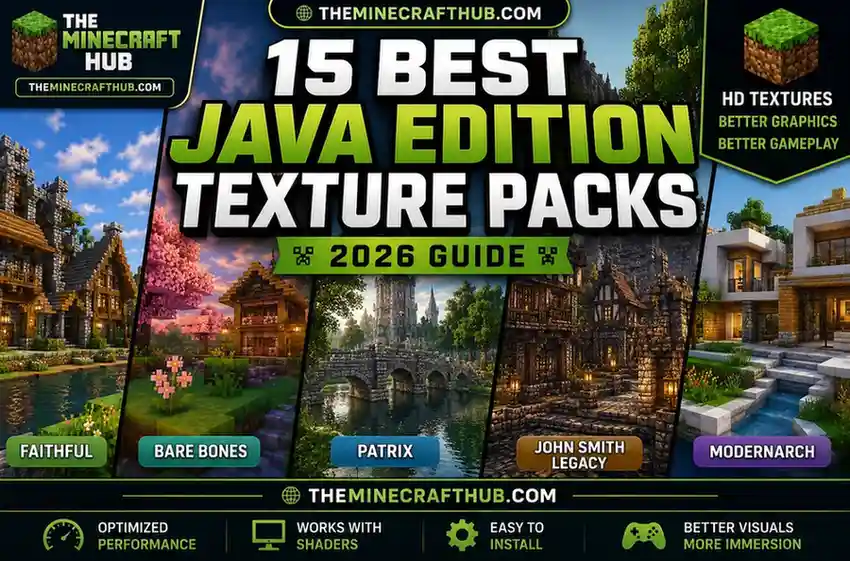
In this guide, we’ve carefully selected the 15 best Java Edition texture packs based on visual quality, performance, update frequency, compatibility, and community popularity. Whether you’re building massive cities, exploring survival worlds, or recording cinematic videos, these packs can dramatically improve your Minecraft experience.
What Are Java Edition Texture Packs?
Java Edition texture packs, now officially called resource packs, are downloadable files that replace Minecraft’s default textures, sounds, fonts, models, animations, and visual effects. They allow players to customize how blocks, mobs, items, GUIs, and environments look while keeping the game’s mechanics unchanged.
One of the biggest advantages of Minecraft Java Edition is its open modding ecosystem. Unlike Bedrock Edition, Java resource packs can work alongside popular tools such as OptiFine, Fabric, Forge, Continuity, ConnectedTexturesMod (CTM), and shaders like BSL, Complementary, or SEUS. This makes Java Edition the preferred platform for players who want deeper visual customization.
Depending on the pack you choose, you can:
- Improve default Minecraft textures while preserving the vanilla style.
- Add realistic materials with HD resolutions such as 128x, 256x, or even 1024x.
- Increase FPS using lightweight performance-focused packs.
- Create modern, medieval, fantasy, or cartoon-themed worlds.
- Enhance lighting, connected textures, and block variations when paired with supported mods.
Because every player has different hardware and visual preferences, Java Edition offers texture packs in multiple resolutions. Lower resolutions such as 16x and 32x deliver excellent performance on most computers, while 128x, 256x, and higher resolutions provide stunning detail but require more powerful hardware.
If you’re unsure where to begin, the comparison below highlights the best Java Edition texture packs available in 2026.
15 Best Java Edition Texture Packs for Minecraft
After testing visual quality, performance, update frequency, compatibility, and community popularity, these are the best Java Edition texture packs you should try in 2026.
1. Faithful Texture Pack
Overview
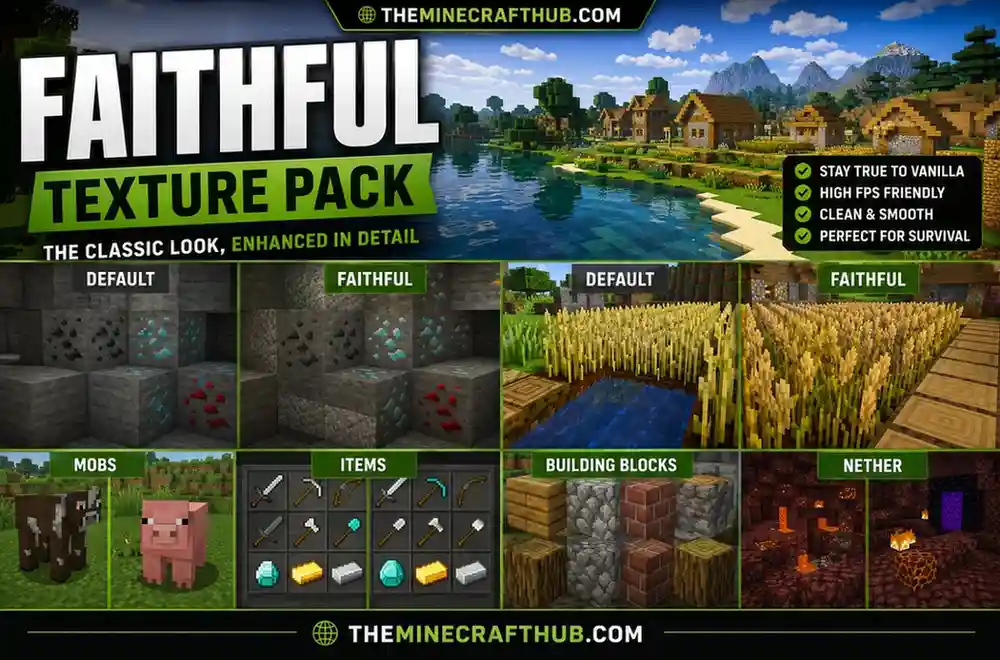
Faithful is one of the most popular Minecraft Java Edition texture packs ever created. Instead of completely redesigning the game’s appearance, it enhances the original Minecraft textures while preserving Mojang’s iconic art style. Every block, item, mob, and interface element looks sharper, cleaner, and more detailed without changing the familiar vanilla experience.
Because it maintains the original look of Minecraft, Faithful is often the first choice for players who want improved graphics without making the game feel different. It is also one of the most frequently updated texture packs and supports the latest Minecraft Java versions.
Key Features
- Doubles the default resolution from 16x to 32x.
- Preserves the classic vanilla Minecraft style.
- Cleaner textures for blocks, items, mobs, and GUI.
- Frequently updated for new Minecraft releases.
- Excellent compatibility with OptiFine and shaders.
- Supports both Java Edition and Bedrock Edition.
Pros
- Maintains the original Minecraft appearance.
- Smooth performance on most computers.
- Large community with regular updates.
- Excellent compatibility with shaders.
- Great for long survival worlds.
Cons
- Doesn’t dramatically change Minecraft’s graphics.
- Players looking for realistic visuals may prefer HD packs.
Specifications
| Feature | Details |
|---|---|
| Style | Vanilla+ |
| Resolution | 32x |
| Performance | ⭐⭐⭐⭐⭐ |
| Java Edition | ✅ |
| Bedrock Edition | ✅ |
| Best For | Survival, Multiplayer, Vanilla Fans |
2. Stay True Texture Pack
Overview
If Faithful focuses on sharper textures, Stay True focuses on improving Minecraft’s atmosphere. It carefully redesigns blocks using softer colors, natural gradients, connected textures, and subtle variations while staying remarkably close to vanilla Minecraft.
The pack makes forests, villages, caves, and mountains look richer without sacrificing performance. Many players consider Stay True the perfect middle ground between vanilla Minecraft and fully customized resource packs.
When paired with shaders such as Complementary or BSL, the results are especially impressive, producing vibrant environments while keeping gameplay smooth.
Key Features
- Improved vanilla color palette.
- Connected textures with OptiFine support.
- Natural-looking terrain.
- Better foliage and vegetation.
- Enhanced lighting compatibility.
- Regular updates.
Pros
- Beautiful natural environments.
- Excellent FPS.
- Lightweight installation.
- Perfect for survival gameplay.
Cons
- Java Edition only.
- Requires OptiFine for some visual enhancements.
Specifications
| Feature | Details |
|---|---|
| Style | Improved Vanilla |
| Resolution | 16x |
| Performance | ⭐⭐⭐⭐⭐ |
| Java Edition | ✅ |
| Bedrock Edition | ❌ |
| Best For | Survival Players |
3. Clarity Texture Pack
Overview
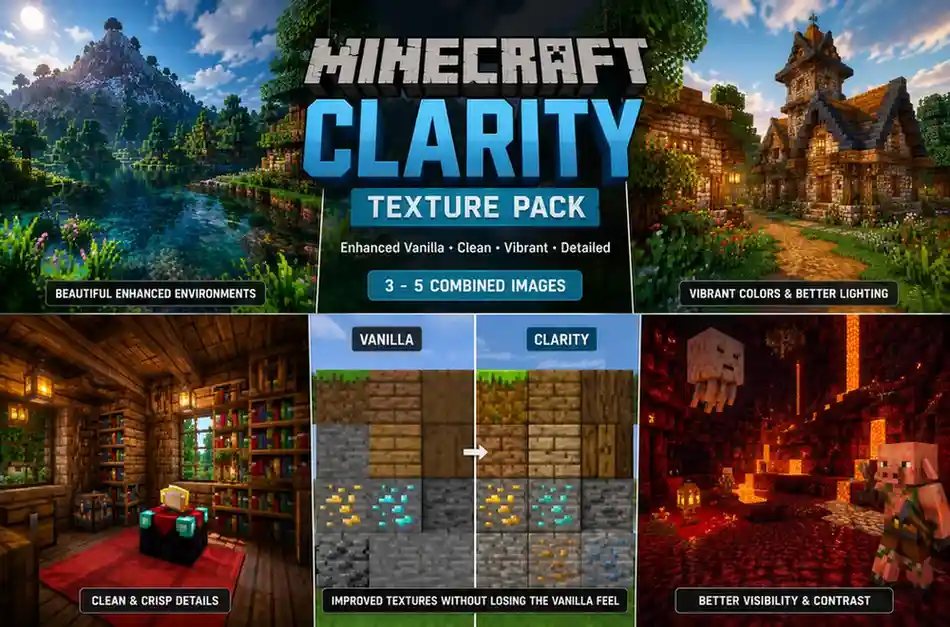
Clarity is designed for players who want Minecraft to look cleaner and more vibrant without abandoning its original style. It enhances nearly every texture with sharper edges, richer colors, and greater detail while maintaining the game’s recognizable identity.
Unlike highly realistic resource packs, Clarity balances visual quality and performance, making it suitable for both casual players and long-term survival worlds. The improved textures make structures easier to distinguish, caves more immersive, and landscapes noticeably more detailed without overwhelming lower-end hardware.
Clarity is also available for both Minecraft Java Edition and Bedrock Edition, making it one of the most versatile texture packs on this list.
Key Features
- Crisp, high-quality vanilla-inspired textures.
- Enhanced colors and environmental detail.
- Smooth performance on mid-range systems.
- Compatible with shaders for even better visuals.
- Regularly updated for recent Minecraft versions.
Pros
- Excellent balance of quality and performance.
- Works well for survival and creative mode.
- Cross-platform availability.
- Great shader compatibility.
Cons
- Doesn’t offer the ultra-realistic appearance of HD packs.
- Some players may prefer more dramatic visual changes.
Specifications
| Feature | Details |
|---|---|
| Style | Enhanced Vanilla |
| Resolution | 32x |
| Performance | ⭐⭐⭐⭐☆ |
| Java Edition | ✅ |
| Bedrock Edition | ✅ |
| Best For | Everyday Gameplay |
4. Patrix Texture Pack
Overview
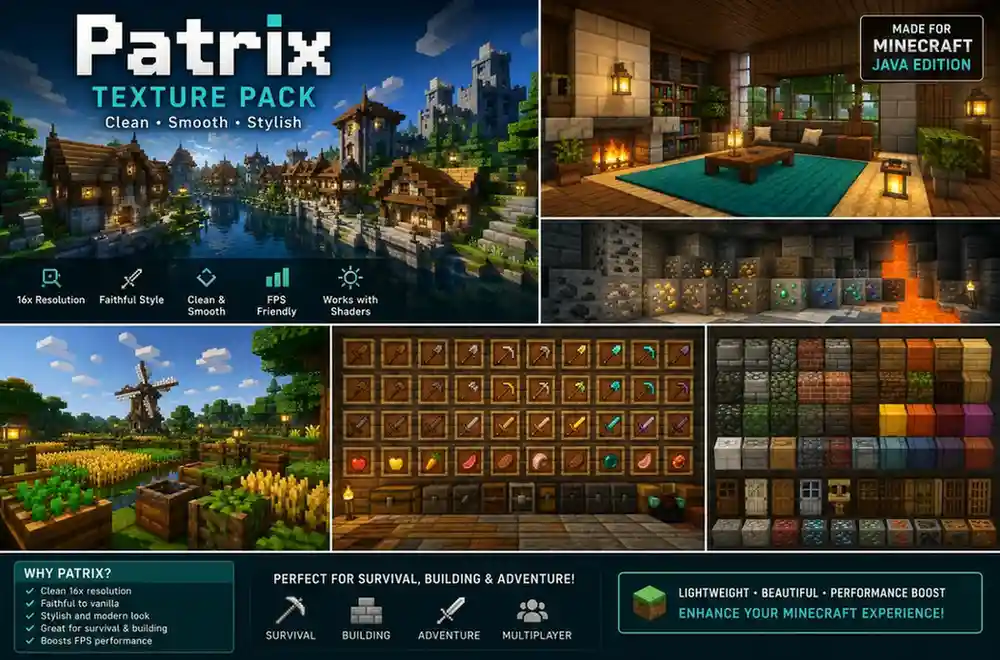
If you’re looking for the most realistic Minecraft experience possible, Patrix is one of the best Java Edition texture packs available. Designed with ultra-high-definition textures, Patrix transforms Minecraft into a visually stunning world featuring detailed stone, wood, water, vegetation, and lighting effects.
Available in resolutions ranging from 32x to 256x (and higher for supporters), Patrix is ideal for players using powerful gaming PCs. When combined with popular shaders such as Complementary, BSL, or SEUS PTGI, it creates a near-photorealistic Minecraft experience.
Although demanding on hardware, Patrix remains one of the highest-rated HD resource packs within the Minecraft community.
Key Features
- Ultra-realistic HD textures
- Multiple resolutions from 32x to 256x+
- Excellent shader compatibility
- Highly detailed blocks and environments
- Frequently updated for recent Minecraft versions
Pros
- Incredible realism
- Premium-quality textures
- Great for screenshots and cinematic builds
- Excellent support for shaders
Cons
- Requires a powerful GPU
- Lower FPS on older computers
- Larger download size
Specifications
| Feature | Details |
|---|---|
| Style | Realistic |
| Resolution | 128x–256x |
| Performance | ⭐⭐⭐☆☆ |
| Java Edition | ✅ |
| Bedrock Edition | ❌ |
| Best For | Ultra HD Graphics |
5. ModernArch Texture Pack
Overview
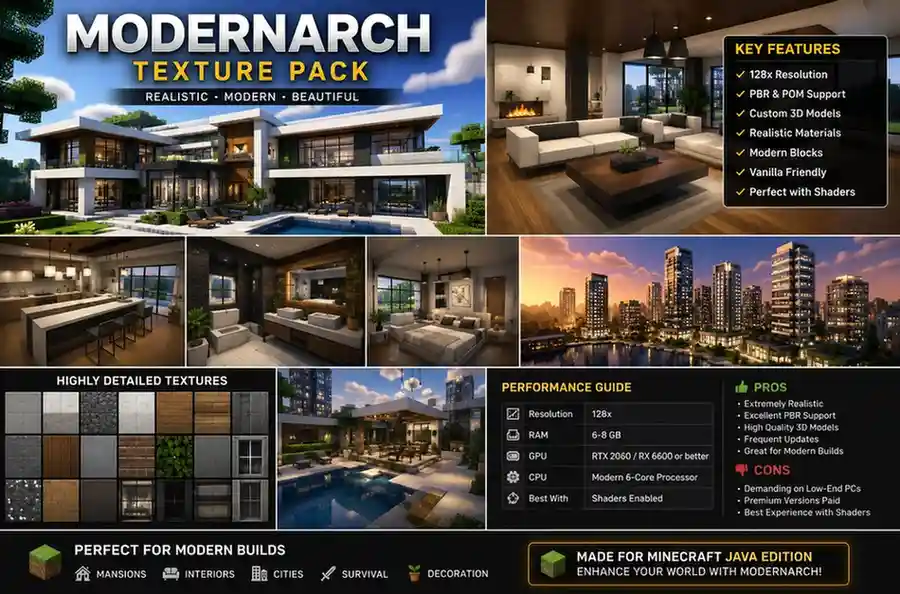
ModernArch pushes Minecraft graphics even further with some of the highest-resolution textures available. Designed specifically for high-end gaming systems, this resource pack focuses on photorealistic materials, advanced PBR textures, reflections, and realistic lighting when paired with RTX-compatible shaders.
Every block is recreated with exceptional detail, making buildings, interiors, and landscapes resemble modern architectural visualizations rather than traditional Minecraft worlds.
Because of its extremely high resolution, ModernArch is best suited for players with dedicated graphics cards and plenty of available memory.
Key Features
- Ultra HD textures up to 1024x
- Photorealistic materials
- Designed for RTX and shaders
- PBR texture support
- Exceptional detail
Pros
- One of the best-looking texture packs available
- Perfect for modern builds
- Outstanding lighting effects
- Great for cinematic videos
Cons
- Very demanding hardware requirements
- Not suitable for low-end PCs
- Larger installation size
Specifications
| Feature | Details |
|---|---|
| Style | RTX / Realistic |
| Resolution | 256x–1024x |
| Performance | ⭐⭐☆☆☆ |
| Java Edition | ✅ |
| Bedrock Edition | ❌ |
| Best For | High-End PCs |
6. Bare Bones Texture Pack
Overview
Inspired by Minecraft’s official trailers and promotional artwork, Bare Bones simplifies textures to create a clean, colorful, and cartoon-like appearance. Rather than adding extra detail, it removes unnecessary visual noise, resulting in a bright and consistent aesthetic.
Because it uses lightweight 16x textures, Bare Bones delivers excellent performance on virtually every computer while remaining compatible with both Java and Bedrock Edition.
It is especially popular among casual players, YouTubers, and builders who prefer a vibrant visual style.
Key Features
- Trailer-inspired graphics
- Lightweight 16x resolution
- Bright colors
- Excellent FPS
- Cross-platform support
Pros
- Extremely lightweight
- Smooth gameplay
- Unique art style
- Beginner friendly
Cons
- Limited realism
- May feel too simple for some players
Specifications
| Feature | Details |
|---|---|
| Style | Cartoon |
| Resolution | 16x |
| Performance | ⭐⭐⭐⭐⭐ |
| Java Edition | ✅ |
| Bedrock Edition | ✅ |
| Best For | Simple Visuals |
7. Mizuno’s 16 Craft
Overview
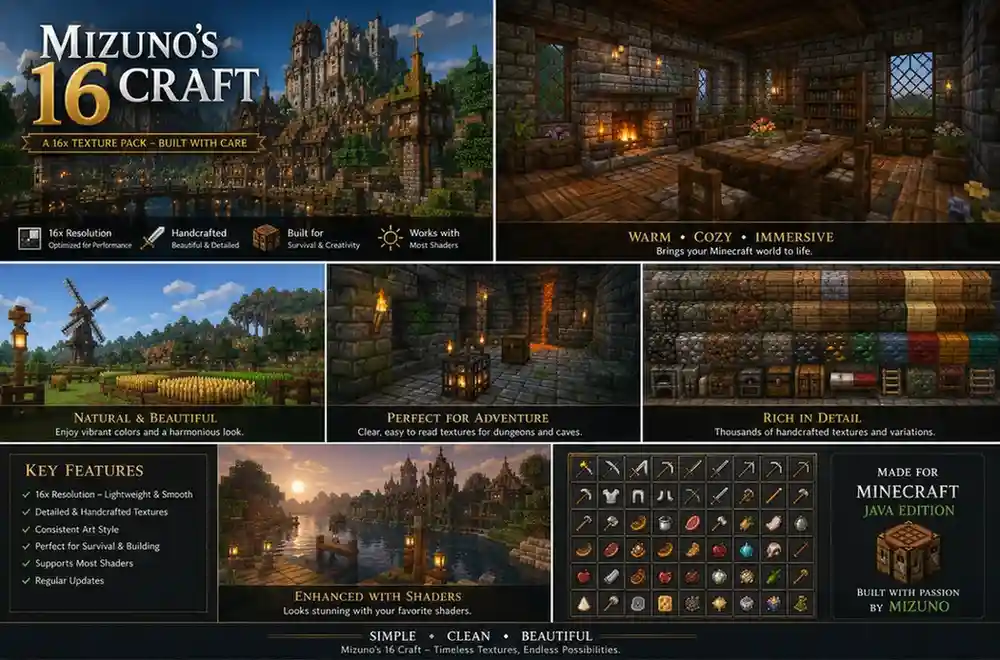
Mizuno’s 16 Craft is one of the most beloved resource packs among builders and creative players. It introduces soft colors, handcrafted textures, decorative block variations, and subtle details that make villages, cottages, gardens, and interiors feel warm and inviting.
Despite using a standard 16x resolution, the pack delivers impressive visual improvements without significantly affecting performance. Its artistic style has made it a favorite for players who enjoy medieval, fantasy, and Japanese-inspired architecture.
The resource pack also works exceptionally well with shaders, enhancing natural lighting and atmospheric effects.
Key Features
- Beautiful handcrafted textures
- Decorative block variations
- Soft natural color palette
- Excellent building aesthetics
- Great shader compatibility
Pros
- Perfect for builders
- Excellent visual consistency
- Lightweight performance
- Frequently updated
Cons
- Java Edition only
- Less suitable for players seeking realism
Specifications
| Feature | Details |
|---|---|
| Style | Japanese Style |
| Resolution | 16x |
| Performance | ⭐⭐⭐⭐☆ |
| Java Edition | ✅ |
| Bedrock Edition | ❌ |
| Best For | Builders |
8. John Smith Legacy
Overview
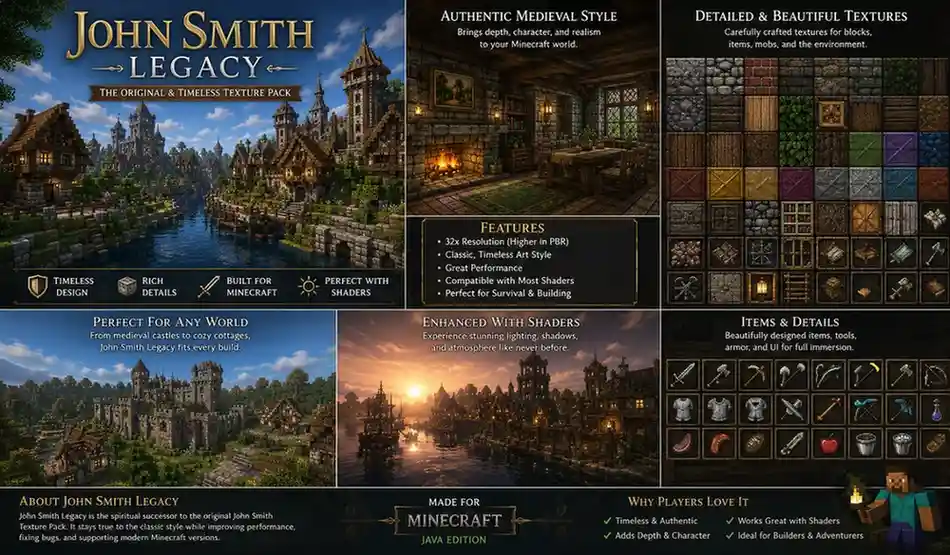
For players who enjoy medieval castles, fantasy kingdoms, and RPG-inspired worlds, John Smith Legacy remains one of the most iconic Minecraft Java Edition texture packs. Originally released over a decade ago, it continues to receive community updates, making it compatible with modern Minecraft versions.
The pack replaces Minecraft’s bright default textures with darker, rugged materials that give stone, wood, bricks, and vegetation a realistic medieval appearance. This style makes it especially popular for adventure maps, role-playing servers, and large castle builds.
Although the textures are more detailed than vanilla, the 32x resolution still provides solid performance on most mid-range gaming PCs.
Key Features
- Medieval-inspired texture design
- Detailed stone, wood, and brick textures
- Excellent for castles and fantasy builds
- Frequently updated by the community
- Works well with shaders
Pros
- Unique medieval atmosphere
- Great for RPG servers
- Balanced visual quality and performance
- Large community support
Cons
- Not suitable for modern city builds
- Some textures appear darker than vanilla
Specifications
| Feature | Details |
|---|---|
| Style | Medieval |
| Resolution | 32x |
| Performance | ⭐⭐⭐⭐☆ |
| Java Edition | ✅ |
| Bedrock Edition | ❌ |
| Best For | Fantasy Worlds |
9. Rodrigo’s Pack
Overview
If your priority is achieving the highest possible FPS without sacrificing visual clarity, Rodrigo’s Pack is one of the best choices available. Using lightweight 8x textures, it significantly reduces the graphical workload while keeping Minecraft clean and easy to play.
The simplified textures improve frame rates on older laptops, budget desktops, and integrated graphics, making it a favorite among players with low-end hardware. Despite its minimalist style, important blocks and items remain easy to recognize during survival gameplay.
Rodrigo’s Pack is an excellent option for players who experience lag with higher-resolution resource packs.
Key Features
- Lightweight 8x textures
- Excellent FPS improvements
- Minimal system requirements
- Fast loading times
- Ideal for older hardware
Pros
- Outstanding performance
- Perfect for low-end PCs
- Easy-to-recognize textures
- Smooth gameplay
Cons
- Less visual detail
- Limited realism
Specifications
| Feature | Details |
|---|---|
| Style | Performance |
| Resolution | 8x |
| Performance | ⭐⭐⭐⭐⭐ |
| Java Edition | ✅ |
| Bedrock Edition | ❌ |
| Best For | Low-End PCs |
10. SapixCraft
Overview
SapixCraft combines colorful visuals with highly detailed textures, making Minecraft look brighter, cleaner, and more vibrant. The pack offers multiple resolutions, allowing players to choose between better performance or ultra-high-definition graphics depending on their hardware.
Its bold colors and polished textures make it a popular choice for creative mode, city projects, and showcase builds. The higher-resolution versions pair exceptionally well with shaders, producing realistic lighting and reflections while maintaining the pack’s signature artistic style.
SapixCraft is available in several resolutions ranging from 32x to 512x, giving players plenty of flexibility.
Key Features
- Multiple HD resolutions
- Bright, colorful textures
- Smooth block details
- Excellent shader support
- Regular updates
Pros
- Beautiful modern visuals
- Flexible resolution options
- Great for creative builds
- Good overall performance
Cons
- Higher resolutions require stronger hardware
- Slight FPS reduction on older systems
Specifications
| Feature | Details |
|---|---|
| Style | Cartoon HD |
| Resolution | 32x–512x |
| Performance | ⭐⭐⭐⭐☆ |
| Java Edition | ✅ |
| Bedrock Edition | ❌ |
| Best For | Colorful Builds |
11. Compliance
Overview
Compliance is one of the closest alternatives to Minecraft’s original textures while offering cleaner artwork and improved consistency. Every block, item, and interface element is carefully redesigned to stay true to Mojang’s visual style, making it feel like an official graphical upgrade rather than a complete redesign.
Because it uses a lightweight 32x resolution, Compliance delivers excellent performance across a wide range of systems. It is also available for both Java Edition and Bedrock Edition, making it one of the most accessible resource packs for players who switch between platforms.
If you enjoy vanilla Minecraft but want sharper and more polished textures, Compliance is an excellent choice.
Key Features
- Faithful recreation of vanilla textures
- Improved texture consistency
- Lightweight 32x resolution
- Cross-platform support
- Excellent compatibility with shaders
Pros
- Authentic Minecraft appearance
- Smooth performance
- Great for long survival worlds
- Frequently updated
Cons
- Less dramatic visual improvements
- Not intended for realistic graphics
Specifications
| Feature | Details |
|---|---|
| Style | Vanilla Accurate |
| Resolution | 32x |
| Performance | ⭐⭐⭐⭐⭐ |
| Java Edition | ✅ |
| Bedrock Edition | ✅ |
| Best For | Authentic Experience |
12. Dokucraft
Overview
Dokucraft is one of Minecraft’s oldest and most recognizable fantasy-themed resource packs. Designed with RPG adventures in mind, it completely transforms the game into a medieval world filled with detailed castles, ancient ruins, magical forests, and rustic villages.
Unlike vanilla-inspired packs, Dokucraft introduces darker textures, custom artwork, and immersive environmental details that perfectly complement adventure maps and role-playing servers. The pack has remained popular for years thanks to regular community updates and compatibility with modern Minecraft Java versions.
If you enjoy fantasy storytelling or medieval architecture, Dokucraft is a must-try resource pack.
Key Features
- Fantasy-inspired textures
- Medieval visual theme
- Excellent for RPG gameplay
- High-quality environmental details
- Active community support
Pros
- Unique fantasy atmosphere
- Great for adventure maps
- Compatible with shaders
- Well-established community
Cons
- Less suitable for modern builds
- Some textures may feel darker than vanilla
Specifications
| Feature | Details |
|---|---|
| Style | Fantasy |
| Resolution | 32x |
| Performance | ⭐⭐⭐⭐☆ |
| Java Edition | ✅ |
| Bedrock Edition | ❌ |
| Best For | RPG & Adventure Worlds |
13. LB Photo Realism
Overview
If realism is your priority, LB Photo Realism is another outstanding choice for Minecraft Java Edition. It replaces nearly every default texture with highly detailed materials inspired by real-world surfaces, giving blocks, landscapes, and structures a far more lifelike appearance.
Available in several HD resolutions, LB Photo Realism works exceptionally well with popular shader packs, producing realistic lighting, shadows, reflections, and water effects. While the higher-resolution versions demand stronger hardware, the visual improvements are well worth it for players with capable gaming PCs.
Key Features
- High-definition realistic textures
- Multiple resolution options
- Excellent shader compatibility
- Detailed natural environments
- Frequently updated
Pros
- Beautiful realistic visuals
- Great for screenshots
- Excellent for cinematic gameplay
- Multiple resolution choices
Cons
- Requires more powerful hardware
- Lower FPS on budget systems
Specifications
| Feature | Details |
|---|---|
| Style | Realistic |
| Resolution | 64x–512x |
| Performance | ⭐⭐⭐☆☆ |
| Java Edition | ✅ |
| Bedrock Edition | ❌ |
| Best For | Realistic Gameplay |
14. Jicklus
Overview
Jicklus offers a refreshing take on Minecraft’s default graphics by blending warm colors, hand-painted textures, and subtle environmental improvements. Rather than aiming for realism, it enhances Minecraft’s natural beauty while preserving the charm of the original game.
The pack is especially popular among survival players because forests, mountains, farms, and villages feel more vibrant without becoming visually overwhelming. It also performs well on most mid-range systems, making it an excellent everyday resource pack.
Key Features
- Warm natural color palette
- Hand-painted texture style
- Lightweight performance
- Excellent for survival gameplay
- Shader friendly
Pros
- Beautiful artistic style
- Great visual consistency
- Smooth gameplay
- Frequently updated
Cons
- Limited realism
- Java Edition only
Specifications
| Feature | Details |
|---|---|
| Style | Rustic Vanilla |
| Resolution | 16x |
| Performance | ⭐⭐⭐⭐⭐ |
| Java Edition | ✅ |
| Bedrock Edition | ❌ |
| Best For | Survival Players |
15. Quadral
Overview
Rounding out our list is Quadral, a lightweight resource pack that gives Minecraft a clean, colorful, and modern appearance without sacrificing performance. Its smooth textures, consistent color palette, and simplified artwork make the game feel fresh while remaining instantly recognizable.
Quadral is an excellent choice for players who enjoy creative building, exploration, and casual survival gameplay. Thanks to its efficient 16x resolution, it also performs exceptionally well on low-end and mid-range PCs.
Key Features
- Clean modern textures
- Lightweight 16x resolution
- Bright color palette
- Great optimization
- Beginner friendly
Pros
- Excellent FPS
- Easy to install
- Clean visual design
- Suitable for most computers
Cons
- Doesn’t provide realistic graphics
- Limited advanced visual effects
Specifications
| Feature | Details |
|---|---|
| Style | Modern Vanilla |
| Resolution | 16x |
| Performance | ⭐⭐⭐⭐⭐ |
| Java Edition | ✅ |
| Bedrock Edition | ❌ |
| Best For | Casual Gameplay |
Which Java Edition Texture Pack Should You Choose?
The best texture pack ultimately depends on your preferred playstyle and your computer’s hardware. If you want a visual upgrade that stays true to vanilla Minecraft, Faithful, Compliance, and Stay True are excellent choices. Players seeking photorealistic graphics should consider Patrix, ModernArch, or LB Photo Realism, while those with older computers will benefit from lightweight options like Rodrigo’s Pack, Quadral, and Bare Bones.
Builders and creative players may prefer the artistic style of Mizuno’s 16 Craft or the colorful appearance of SapixCraft, while medieval and fantasy enthusiasts will enjoy John Smith Legacy and Dokucraft.
No matter which pack you choose, all of the resource packs listed above are trusted by the Minecraft community and offer unique ways to enhance your Java Edition experience in 2026.
Best Java Edition Texture Packs by Category
Not every Minecraft player is looking for the same type of resource pack. Some prefer realistic graphics, while others prioritize higher FPS, authentic vanilla visuals, or creative building. The table below highlights our top recommendations based on different playstyles.
| Category | Recommended Texture Pack | Why We Recommend It |
|---|---|---|
| 🏆 Best Overall | Faithful | Sharp vanilla-style textures with excellent performance and cross-platform support. |
| 🌿 Best Vanilla Experience | Stay True | Enhances Minecraft’s original look while preserving its classic charm. |
| 🎨 Best for Builders | Mizuno’s 16 Craft | Beautiful handcrafted textures perfect for detailed builds and creative projects. |
| 🏰 Best Medieval Style | John Smith Legacy | Ideal for castles, fantasy worlds, and RPG-inspired gameplay. |
| 📸 Best Realistic Graphics | Patrix | Stunning HD textures for players seeking photorealistic visuals. |
| 💎 Best RTX Experience | ModernArch | Premium-quality textures designed for high-end PCs with shaders. |
| 🚀 Best FPS Boost | Rodrigo’s Pack | Lightweight textures that significantly improve performance on older systems. |
| 🎭 Best Cartoon Style | Bare Bones | Inspired by Minecraft trailers with colorful, simplified visuals. |
| 🌈 Best Creative Builds | SapixCraft | Bright, vibrant textures available in multiple HD resolutions. |
| ✅ Best Authentic Alternative | Compliance | Faithful recreation of Minecraft’s original textures with improved consistency. |
Minimum System Requirements for Java Edition Texture Packs
The performance of a texture pack depends largely on its resolution and your computer’s hardware. Lightweight 16x and 32x resource packs run smoothly on most systems, while HD packs such as 256x or 512x require significantly more processing power.
| Component | Recommended for 16x–32x Packs | Recommended for 128x–512x Packs |
|---|---|---|
| Minecraft Version | Java Edition 1.21+ | Java Edition 1.21+ |
| Java | Java 21 or newer | Java 21 or newer |
| RAM | 4 GB (8 GB allocated recommended) | 16 GB or more |
| CPU | Intel Core i5 / Ryzen 5 | Intel Core i7 / Ryzen 7 or better |
| Graphics Card | GTX 1050 / RX 570 | RTX 3060 / RX 6700 XT or better |
| Storage | 2 GB free space | 5 GB free space |
| Shader Support | Optional | Recommended |
| OptiFine / Sodium | Recommended | Strongly Recommended |
Tip: If you’re using 256x or higher texture packs, consider installing Sodium, Lithium, or OptiFine to improve performance and reduce frame drops.
How to Install Java Edition Texture Packs
Installing a texture pack on Minecraft Java Edition only takes a few minutes. Follow these steps:
Step 1: Download the Texture Pack
Download the resource pack from its official website or a trusted Minecraft community source.
Step 2: Open Minecraft
Launch Minecraft Java Edition and wait until the main menu appears.
Step 3: Open Resource Packs
Go to:
Options → Resource Packs
Click Open Pack Folder.
Step 4: Move the ZIP File
Copy or drag the downloaded ZIP file into the Resource Packs folder.
Important: Do not extract the ZIP file unless the pack’s developer specifically instructs you to do so.
Step 5: Enable the Pack
Return to Minecraft.
The new texture pack should appear in the Available Resource Packs list.
Click the arrow icon to move it into Selected Resource Packs.
Step 6: Apply Changes
Click Done.
Minecraft will reload the textures automatically, and your new resource pack will be ready to use.
Java Edition vs Bedrock Edition Texture Packs
Although both versions support texture customization, Java Edition offers considerably more flexibility and customization options than Bedrock Edition.
| Feature | Java Edition | Bedrock Edition |
|---|---|---|
| Resource Packs | ✅ | ✅ |
| Shader Support | ✅ Excellent | ⚠ Limited |
| Custom Models | ✅ | Limited |
| Connected Textures | ✅ | Limited |
| OptiFine Support | ✅ | ❌ |
| Fabric Mods | ✅ | ❌ |
| Forge Mods | ✅ | ❌ |
| RTX Support | Through shaders | Native RTX (supported devices) |
| Community Packs | Largest Collection | Smaller Library |
| Customizability | ⭐⭐⭐⭐⭐ | ⭐⭐⭐⭐☆ |
If you enjoy experimenting with graphics, shaders, and advanced customization, Minecraft Java Edition remains the best platform for texture packs.
How We Selected These Texture Packs
To ensure this list is accurate and genuinely useful, we evaluated each texture pack using consistent criteria instead of relying solely on download numbers or popularity.
Each resource pack was reviewed based on:
- Visual quality and overall design
- Performance impact on different PC configurations
- Compatibility with the latest Minecraft Java Edition versions
- Update frequency and ongoing developer support
- Community reputation and long-term reliability
- Compatibility with popular tools such as OptiFine, Sodium, Fabric, and shaders
- Ease of installation for both new and experienced players
Our goal was to recommend texture packs that not only look great but also provide a stable and enjoyable gameplay experience for different types of Minecraft players.
Frequently Asked Questions
Find answers to the most common questions about Minecraft Java Edition texture packs, installation, compatibility, performance, and resource packs.
What are Java Edition texture packs?
Which is the best Java Edition texture pack?
Are Minecraft Java texture packs free?
Do texture packs reduce FPS?
Which texture pack is best for low-end PCs?
- Rodrigo’s Pack
- Bare Bones
- Faithful
- Compliance
- Stay True
Can I use shaders with Java Edition texture packs?
Do I need OptiFine?
What’s the difference between texture packs and resource packs?
Which Minecraft versions are supported?
Can I install multiple texture packs?
How much RAM do HD texture packs require?
Are Java Edition texture packs safe?
Can I use Java texture packs on Bedrock Edition?
Do texture packs affect multiplayer servers?
Which resolution should I choose?
- 16x – Best FPS
- 32x – Best overall balance
- 64x – Sharper visuals
- 128x – High-definition textures
- 256x–512x – Ultra HD for powerful gaming PCs
Can I uninstall a texture pack later?
What is the most realistic Minecraft Java texture pack?
Do texture packs work with Fabric and Forge mods?
Final Thoughts
Minecraft Java Edition offers an incredible variety of texture packs, from lightweight vanilla improvements to ultra-realistic HD overhauls. Whether you want better performance, sharper textures, or cinematic graphics, there’s a resource pack suited to your playstyle and hardware.
For most players, Faithful, Stay True, and Compliance provide the best balance between visual quality and performance. If you’re looking for photorealistic environments, Patrix and ModernArch deliver some of the most impressive graphics available. Players with older systems can enjoy smooth gameplay using lightweight packs such as Rodrigo’s Pack, Bare Bones, or Quadral.
As new Minecraft updates continue to release, the texture packs featured in this guide are regularly maintained by their creators, ensuring compatibility with the latest Java Edition versions. Explore different styles, experiment with shaders, and choose the resource pack that best matches the world you want to create.