
How to Fix Minecraft APK App Not Installed & Parse Error (2026 Guide)
Nothing is more frustrating than downloading a 250 MB Minecraft APK file, only for Android to immediately hit you with “App not installed as package appears to be invalid” or “There was a problem parsing the package.”
In this guide, we break down the 4 real technical causes behind this error and give you 5 guaranteed, step-by-step fixes to get Minecraft running on your Android phone or tablet in minutes.
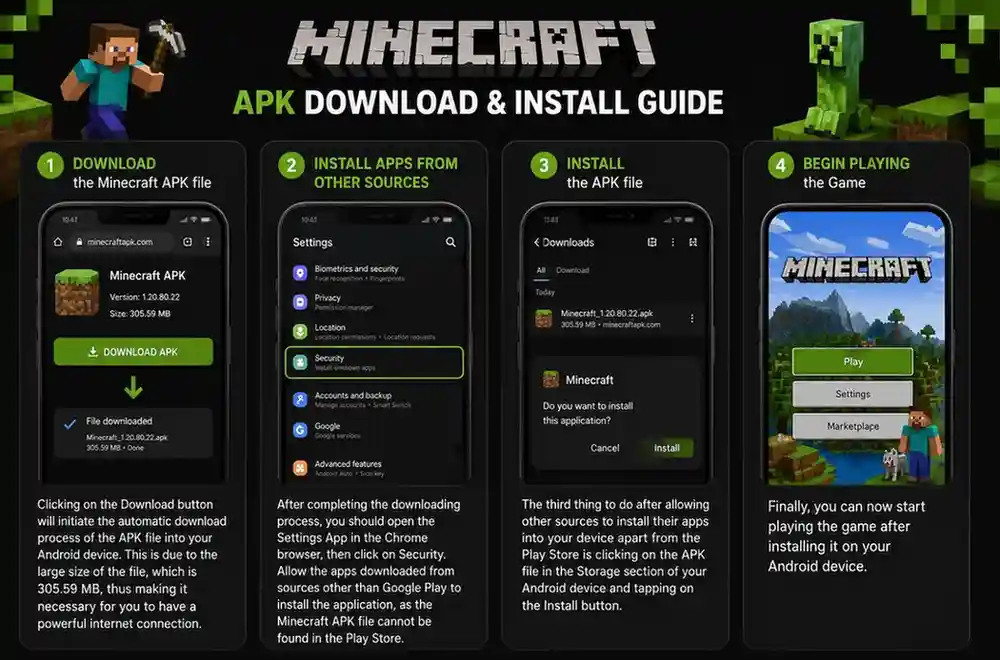
The 4 Real Causes of the “App Not Installed” Error
1. Conflicting Signature Keys (Most Common)
Every Android app is digitally signed by its developer. If you have an older Minecraft build signed with one certificate key, and try to install a new build signed with a different key, Android’s security system blocks the installation instantly to prevent tampering.
2. Corrupted or Incomplete APK Download
If your internet connection dropped for even a split second during download, the APK file can become incomplete. When Android tries to unzip the package header, it triggers the “Problem Parsing the Package” error.
3. Android 14 64-bit Architecture Lock
Modern devices running Android 14 (like Google Pixel 7/8, Galaxy S24, and Xiaomi 14) completely dropped 32-bit app support. If you download an older 32-bit (armeabi-v7a) APK, the phone refuses to execute it.
4. Google Play Protect False Positive
Google Play Protect actively scans downloaded files and often blocks third-party APKs because they were not downloaded directly through the Google Play Store.
5 Step-by-Step Fixes (Tested & Verified)
Fix 1: Clean Reinstall (Backup First!)
If you have signature conflicts, follow this clean reinstall routine:
- Copy your
minecraftWorldsfolder to your Downloads folder using ZArchiver (to keep your saves). - Uninstall the old Minecraft app from your phone.
- Restart your phone to clear temporary package installer cache.
- Tap and install the new Minecraft APK. It will install with 100% success!
Fix 2: Clear Package Installer Cache
Your Android operating system stores cached installation records that can get stuck:
- Open phone Settings > Apps > Manage Apps.
- Tap the 3 dots in the top right and choose Show System Apps.
- Search for Package Installer.
- Tap Clear Data > Clear Cache, then try opening the APK again.
Fix 3: Temporarily Turn Off Google Play Protect
- Open the Google Play Store app.
- Tap your profile avatar in the top right and choose Play Protect.
- Tap the Settings Gear icon in the top right corner.
- Toggle OFF “Scan apps with Play Protect”.
- Install Minecraft, then turn Play Protect back on afterwards.
Fix 4: Ensure You Have at Least 1.5 GB Free Storage
Although the APK download is around 250 MB, Android requires at least 1.5 GB of free temporary space to extract block textures, audio files, and world templates during installation. Go to Settings > Storage and free up unused video files or apps.
Fix 5: Re-download from a Fast, Stable Connection
Verify that your downloaded file size matches the official size (approx. 254 MB). If your file is only 180 MB or 210 MB, delete it and download it again over a stable Wi-Fi network.
Frequently Asked Questions
Why does the installation stop right at 99%?
Stopping at 99% is almost always caused by Play Protect performing a background verification or insufficient RAM. Disabling Play Protect and closing background apps resolves this.
Can I fix the “Parse Error” on an old Android 6.0 or 7.0 phone?
Modern Minecraft 1.21 requires Android 8.0 (Oreo) or higher. If your phone is running Android 6 or 7, you will need to install an older Minecraft build (like 1.16 or 1.18) designed for older Android API levels.
Is it safe to install APKs with “Unknown Sources” enabled?
Yes, as long as you download verified installation files from reputable community sites like TheMinecraftHub that scan all builds with SHA-256 checksums.
Why does it say “App not installed: Conflicting package exists”?
This means a clone version of Minecraft (or Minecraft Beta/Preview) is already installed on your device. You must remove the duplicate app before installing the main release.
What is Split APKs (SAI) and do I need it?
Some newer Minecraft bundles are delivered as .apks or .xapk files. For those files, you can use the free Split APKs Installer (SAI) app to install all split bundles in one go.
Will clearing Package Installer cache delete my personal photos?
No! Package Installer cache only contains temporary installation log files and will not touch your personal media, photos, or documents.
Why does Samsung Secure Folder block APK installations?
Samsung Knox security blocks unverified sideloaded apps inside Secure Folder by default. You can install Minecraft on the regular user space without restriction.
How do I verify if my APK file is corrupted?
Check the exact file size in your file manager. A complete Minecraft 1.21 APK will be between 250 MB and 265 MB.